GenPass — Password Generator
React password generator with customizable options, visual strength indicator, and one-click copy
Pet project — built to learn React ecosystem
An elegant, feature-rich password generator built with React and styled with Tailwind CSS. Generate strong, customizable passwords with visual feedback and one-click copying.
Motivation
I built this to get hands-on with the React ecosystem — hooks-based state management, Vite for tooling, and Tailwind CSS for styling. Most online password generators tend to be cluttered or overly complex, presenting too many options at once without clear feedback about what the user is generating. This project focused on a clean, single-purpose tool with immediate visual feedback: adjust a slider, see a password, copy it with one click.
How It Works
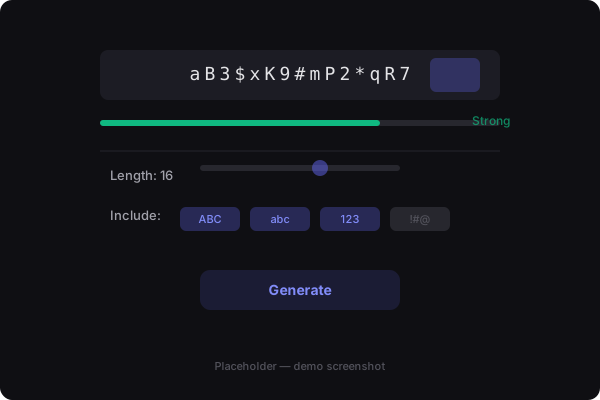
The generator presents a single control panel with a password length slider and toggle switches for character types — uppercase, lowercase, numbers, and symbols. As the user adjusts any control, the generated password updates immediately in the display area above. A color-coded strength bar beneath the password provides visual feedback, shifting from red (weak) through orange to green (strong) as the password options change.
The strength calculation is entropy-based rather than pattern-based. Instead of scoring based on arbitrary rules like "must have uppercase," the calculator measures the actual unpredictability of the generated password. A 16-character password with mixed character types scores higher than a 12-character password of the same character set, regardless of whether it happens to include a symbol or not. This is more honest as a strength metric because it reflects real cryptographic strength rather than superficial rule compliance.
1const CHARACTER_SETS = {2uppercase: 'ABCDEFGHIJKLMNOPQRSTUVWXYZ',3lowercase: 'abcdefghijklmnopqrstuvwxyz',4numbers: '0123456789',5symbols: '!@#$%^&*()_+-=[]{}|;:,.<>?',6}7 8export function generatePassword(length, options) {9const charset = Object.entries(options)10 .filter(([, enabled]) => enabled)11 .map(([key]) => CHARACTER_SETS[key])12 .join('')13 14if (!charset) return ''15 16return Array.from({ length }, () =>17 charset[Math.floor(Math.random() * charset.length)]18).join('')19}20 21export function calculateStrength(password) {22let score = 023if (password.length >= 12) score += 2524if (password.length >= 16) score += 1525if (/[a-z]/.test(password)) score += 1526if (/[A-Z]/.test(password)) score += 1527if (/d/.test(password)) score += 1528if (/[^a-zA-Z0-9]/.test(password)) score += 1529return Math.min(score, 100)30}Copy Feedback
The copy-to-clipboard feature includes a brief visual confirmation animation. When the user clicks the copy button, the icon changes from a clipboard to a checkmark and the button background shifts to green for 1.5 seconds before returning to its default state. This micro-interaction provides immediate feedback that the copy succeeded — important because password generators handle sensitive data, and users need certainty that their new password is in their clipboard.
Project Structure
What I Learned
Separating pure utility functions from the UI made the password logic trivially testable. The generatePassword and calculateStrength functions take inputs and return outputs — no DOM, no events, no state. Testing them is just a matter of calling the function and asserting the result, which means test coverage for the core logic was easy to achieve. This reinforced a general principle: push logic to the edge of your architecture, where it's simplest to verify.
Visual copy feedback significantly improved the perceived reliability of the tool. Without it, users would click the copy button and wonder whether anything happened. A brief animation and color change eliminated that uncertainty entirely. This seems obvious in retrospect, but the first version of the tool had no copy feedback at all.
React 18 with Vite and Tailwind is a genuinely productive combination for focused tools like this. Vite's instant Hot Module Replacement means the feedback loop between editing code and seeing the result is measured in milliseconds. Tailwind's utility classes eliminate context-switching between HTML and CSS files. React hooks provide a clean mental model for state that changes in response to user input. Each tool in the stack handles its domain well, and the combination is greater than the sum of its parts.
Built to explore the React ecosystem. View source · Live demo